
§ 01
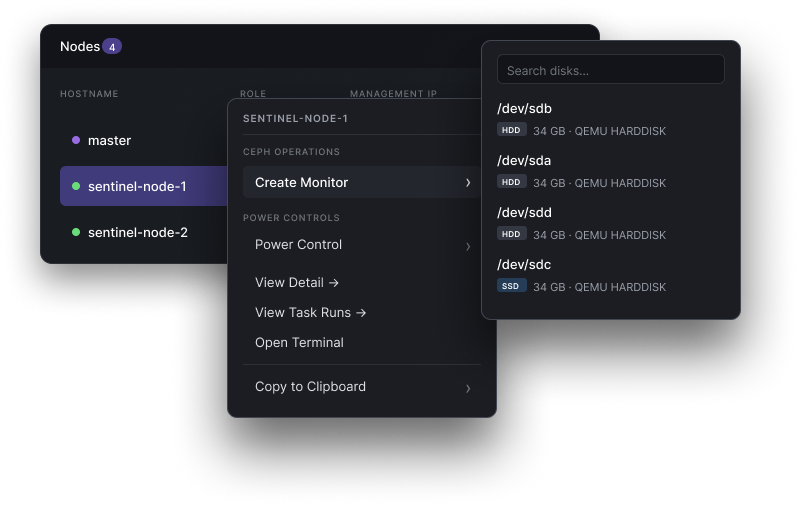
Install a monitor in two clicks.
Right-click any node, pick "Create Monitor". No cephadm, no SSH, no ceph-volume incantations — the quorum just grows.
We ran Ceph at scale for a decade. Sentinel is the tooling we kept wishing existed — one appliance that provisions bare metal, stands up a cluster, and handles day two, from a browser on your own hardware.
§ · the moments
Right-click any node, pick "Create Monitor". No cephadm, no SSH, no ceph-volume incantations — the quorum just grows.
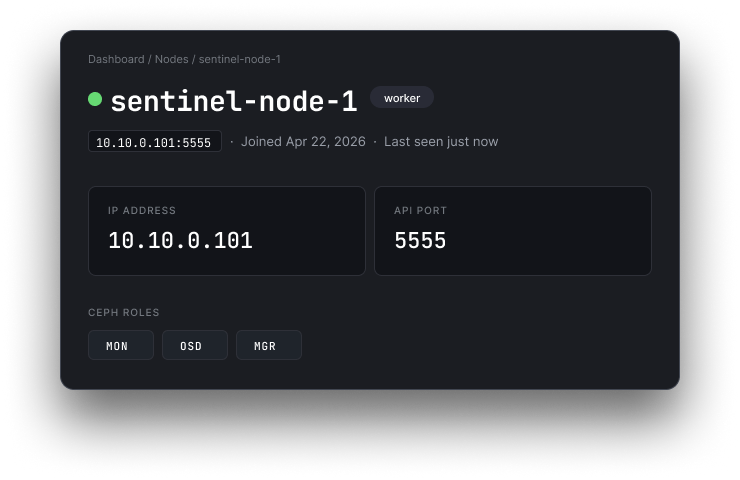
Addressing, health, uptime, Ceph roles, every task ever run against it — everything you'd normally SSH in to check, surfaced on one screen.
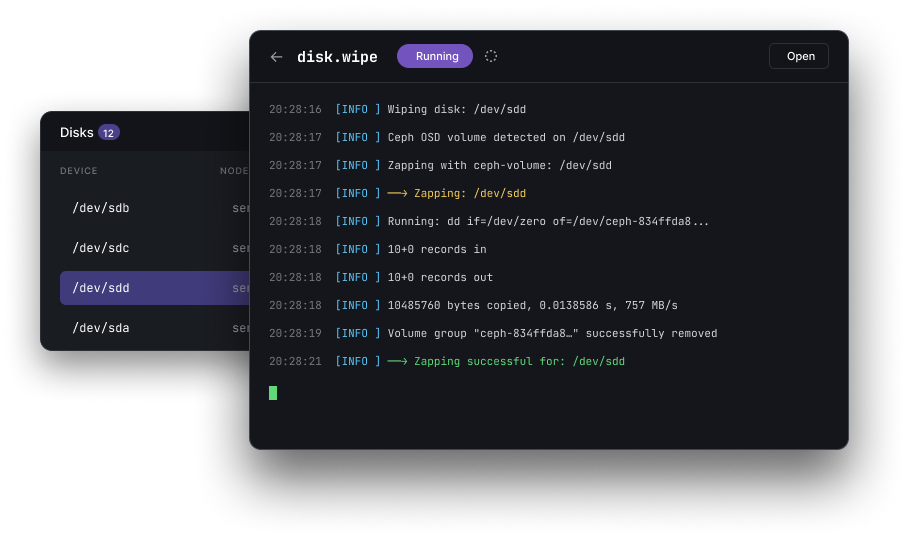
Every long-running task — disk zaps, OSD creates, upgrades — streams its stdout live into the UI. No more ssh-and-tail to know what's happening right now.
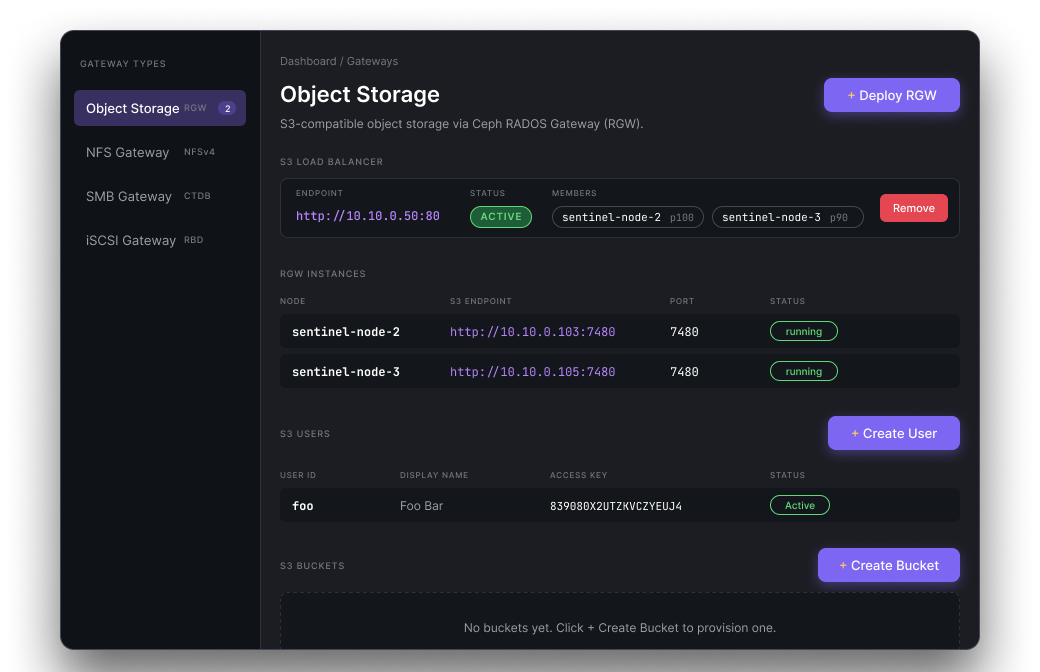
Object (RGW), NFS, SMB, iSCSI — deploy gateways, wire up load balancers, manage S3 users and buckets from a single screen. No separate tool per protocol.
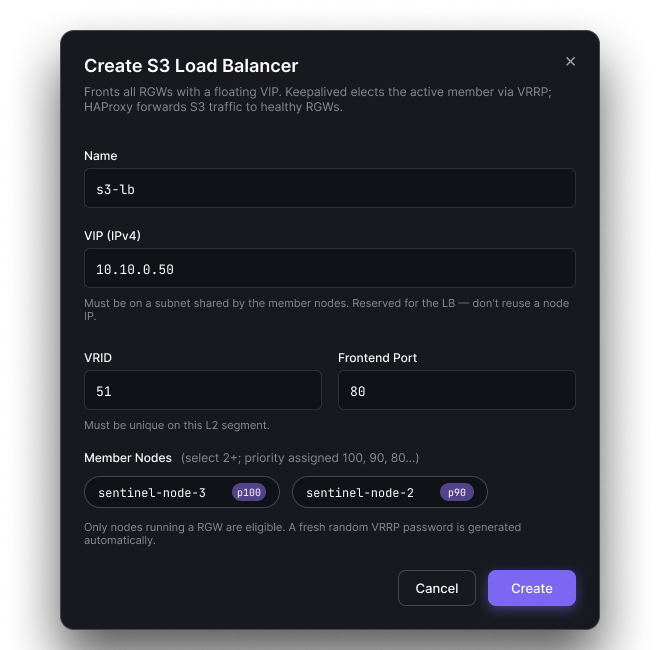
Fronting your RGWs with a floating VIP used to mean hand-writing keepalived.conf and haproxy.cfg. Now it's a form that knows VRID uniqueness, subnet rules, and auto-picks member priorities.
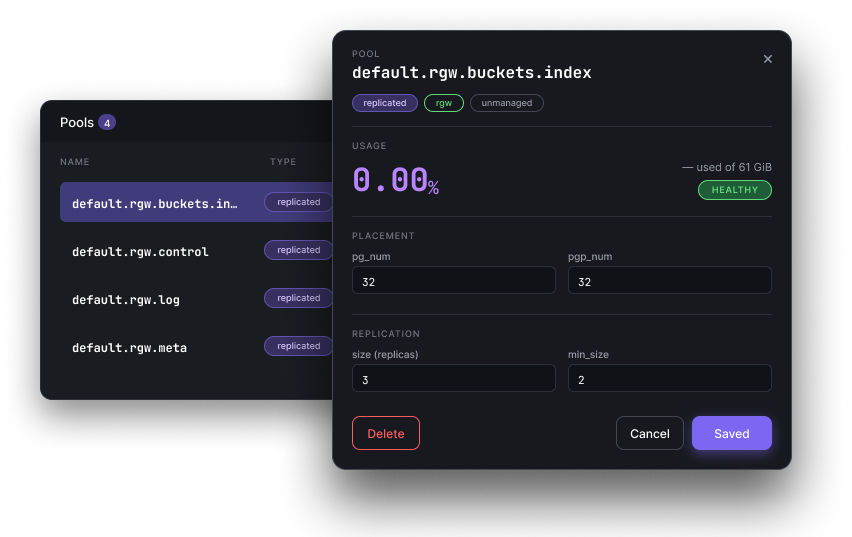
Replication size, pg_num / pgp_num, autoscaler, CRUSH rule, quotas — the tuning that usually lives in ceph osd pool set commands, one drawer per pool. Commits back to Ceph; confirmation right there.
§01 · from boot to ready
Point your DHCP server at the master node. Power on your storage servers. Each one pulls the bootstrap image over iPXE, inventories its hardware, and registers — no hands.
nf network create --range 10.10.1.0/24
Inspect auto-discovered specs: cores, memory, drives, NICs, IPMI. Select nodes, choose Ceph version and failure domain, hit deploy. One command, no playbook.
nf cluster create --version reef --wait
Live IOPS and capacity, pools, OSDs, rolling upgrades, extra clusters — same UI, same API, same CLI. Bring a fourth cluster up at the edge without a new tool.
nf osd create prod-01 --all-drives
§02 · zero-touch
Sentinel's iPXE server boots each node, inventories every CPU core, gigabyte of RAM, and attached drive, then registers it in the control plane — with no operator involvement.
New nodes appear in the browser dashboard within 60 seconds of
power-on. Every action available in the UI is also available via the nf CLI and REST API — use whichever fits your workflow.
$ nf network create --name stor-net \
--range 10.10.1.0/24 --gateway 10.10.1.1
§03 · what's in the box
Independent health, nodes, alerts — shared API. Hop between prod, staging, and the edge lab from a dropdown that remembers where you were.
Sentinel's control plane runs active-passive with automatic master failover — native, not bolted on. Ceph MONs replicate across 3+ hosts underneath. The data path stays pure Ceph; the control plane never sits in front of your I/O.
Drain, upgrade, rejoin — one OSD at a time, while clients keep reading and writing. Automatic rollback on failed health checks.
Block devices, distributed filesystem, S3-compatible object gateway, and NVMe-over-Fabrics targets — every production Ceph protocol, provisioned from one UI.
Per-OSD IOPS, throughput, and latency retained for 30 days. Webhook alerts to Slack, PagerDuty, or any HTTP endpoint.
Any x86_64 with BIOS or UEFI PXE. We regression-test against the configurations below every release.
Reallocated sectors, pending sectors, end-to-end errors — every HDD and NVMe, continuously. We warn before the placement group goes degraded.
§04 · who built this
Our founding team ran Ceph for major cloud providers and infrastructure-intensive shops long before Sentinel existed. We've triaged corrupt placement groups at 2 AM, recovered from cascading OSD flaps, and pushed Luminous-to-Squid upgrades through live production clusters.
Sentinel is the tooling we kept wishing existed — built with the operational depth that only comes from paging yourself.
§05 · pricing, roughly
No card to start, no time limit, no "talk to sales" gate. Follow the quickstart, install the master on one box, point PXE at it — first cluster in under an hour. Upgrade paths for multi-cluster, SLA, and air-gapped deploys when you're ready.
§06 · objections, anticipated
cephadm manages a Ceph cluster you've already provisioned. Sentinel is an appliance platform — it owns the full lifecycle from bare metal. Sentinel's differentiator is an API-first control plane: every action in the UI is available over REST, making it composable with Terraform, Ansible, or your existing runbooks.
Yes. Professional and Enterprise plans include multi-cluster management. All clusters appear in a single dashboard with a quick-switch selector. Each cluster has independent health status, nodes, pools, and alert configuration. The REST API namespaces all resources by cluster ID, making cross-cluster automation straightforward.
Yes. You can run the master node in active-passive configuration with automatic failover. Ceph clusters continue serving I/O regardless — Sentinel is in the control plane, not the data path. Replicated Ceph monitors on three or more nodes ensure cluster health survives any single node failure.
Your cluster keeps running. Sentinel sits in the control plane, not the data path — Ceph continues serving I/O regardless of whether the Sentinel master is reachable. You can manage the cluster directly with cephadm or the Ceph CLI.
Any x86_64 server with BIOS or UEFI PXE support. We test against Dell PowerEdge, HP ProLiant, Supermicro, and common whitebox configurations across 1 GbE, 10 GbE, 25 GbE, and 100 GbE. The hardware compatibility list is in the docs.
Yes. Enterprise deployments run the master node entirely within your network. No telemetry leaves your infrastructure. OS images, Ceph packages, and firmware are hosted on the master and served internally.
§07 · ready?
Free up to three nodes. No card. First cluster deploys in an hour, not a quarter.